
Getting Navarro County Court Records
Start with the official Navarro Odyssey public-access endpoint for criminal, civil, family, and probate searches. That address returned an access error during the September 2026 research check, so an empty or blocked screen should not be read as proof that a record does not exist. The County Clerk and District Clerk remain the direct routes when the portal fails. Eligible electronic civil, family, and probate material may also appear through re:SearchTX, subject to account, coverage, purchase, and access limits.
Navarro County court records can also be requested at the courthouse, by mail, by phone, or, for County Clerk material, by email. A precise request saves time. Name the court, case number if known, record type, date range, and whether a plain or certified copy is needed. Do not send a Social Security number, full driver-license number, birth date, or payment data unless the custodian specifically requires it through a secure channel.
- Identify whether the matter belongs to the District Court, County Court, County Court at Law, a justice court, or a municipal court.
- Try the county portal or re:SearchTX, and record the date and filters used.
- Call or visit the correct clerk when the online result is missing, blocked, or too narrow.
- Mail a focused request to the County Clerk or District Clerk, or email County Clerk requests to ccor@navarrocounty.org.
- Confirm the copy charge and delivery method before paying, then ask whether certification is needed.
Navarro Court Record Clerk Routes
The two main courthouse clerks divide the work. The Navarro County Clerk keeps County Court, probate, misdemeanor, Commissioners Court, and other public records described on its official page. Its criminal desk is on the first floor in Suite 101. Its civil desk is in Basement Suite 001A. Criminal service hours are split by a noon closure, while civil service runs through the workday. The page also says filings received after the stated afternoon cutoff are not accepted that day.
The Navarro District Clerk is the access point for District Court civil, felony criminal, family, and juvenile files. It also publishes links for public searches, e-filing guidance, filing fees, jury material, and appeals. Court coordinators can answer setting or procedure questions, but they should not be treated as the records custodian. A transcript or reporter-held item may follow its own request and fee process.
The official County Clerk page shows the local record departments and access links.
This office view helps a requester separate County Clerk records from District Clerk files before calling or mailing a request.
Navarro County Clerk
300 W 3rd Ave, Corsicana, TX 75110
Mail: P.O. Box 423, Corsicana, TX 75151-0423
903-654-3035
Navarro District Clerk
Suite 201, 300 W 3rd Ave, Corsicana, TX 75110
Mail: P.O. Box 1439, Corsicana, TX 75151
903-654-3040
Court Record Types
A court record may mean a short docket sheet, one filed paper, a signed order, or the full public portion of a case file. Navarro County assigns custody by court. The District Clerk handles district civil, family, felony, and juvenile material. The County Clerk handles County Court misdemeanors and probate files. Justice courts maintain their own civil, eviction, small-claim, and fine-only records. Municipal courts keep city ordinance and Class C citation files.
- Docket sheets and chronological case-event entries
- Petitions, answers, motions, notices, and orders
- Misdemeanor and felony criminal case records
- Civil, family, juvenile, and protective-order records where public
- Probate files, wills, estates, guardianships, citations, and letters
- Justice-court and municipal citation or hearing records
Real-property filings and Commissioners Court minutes may also be held by the County Clerk, but they are not trial-court dockets. The clerk reports daily scanning and computerized records from 1995 forward. Its work to extend older official-public-record images toward 1985 should not be read as proof that every older image is already online.
The county's Justice of the Peace page presents the four precinct contacts and their docket tools.
That source is the proper branch for a JP civil, eviction, small-claim, or fine-only record rather than a district or county clerk file.
Navarro Court Record Portal Limits
The local portal is an official route, but its live endpoint returned HTTP 403 during the research pass. That result confirms an access problem, not the absence of a case. The exact Navarro menus, filters, result columns, document viewer, login rules, and payment prompts could not be verified. Generic Odyssey features must not be presented as locally observed facts.
The captured official Navarro portal state shows why the clerk fallback matters.
If access is restored, verify the court location, case type, and date before relying on a result. For now, use the portal address, then contact the clerk or compare eligible records in re:SearchTX.
Inside a Navarro County Court Record
The contents depend on the court and case. A docket is the event index, while the file holds the papers behind those events. Navarro justice-court sample PDFs show concrete calendar fields such as type, time, court-date type, case number, offense or action, name, and plaintiff or complainant. Those date-specific PDFs are snapshots rather than an all-time county index.
| Case number | The court's identifier. JP samples use case types such as CR and CV, but no single countywide number format was confirmed. |
|---|---|
| Pleadings | Petitions, answers, motions, pleas, notices, and related filed papers. |
| Orders and judgments | Signed rulings, final judgments, and other court directions that are public. |
| Docket sheet | A dated sequence of filings, settings, and court events, not the full file. |
| Setting data | Time, setting type, court, and action labels such as hearing, bench, dismissal, or prove up. |
| Attachments | Public exhibits or supporting documents, if filed and available for remote access. |
A visible docket entry does not guarantee that its attachment is open online. Role limits, processing time, redaction, sealing, or document-purchase rules may affect what can be viewed.
Navarro Court Record Request Details
A written request should ask for existing records with reasonable detail. The county's official open-records form requests contact information, a description, a signature, and a date. Its office-use fields cover copy counts, staff time, postage, other cost, waivers, and totals. That form can help frame a request, but the correct law and custodian still depend on whether the item is a court case record, another judicial record, or an administrative county record.
For County Clerk records, email ccor@navarrocounty.org or mail the request to the clerk's post-office box. For District Court files, use the District Clerk's office and mailing address. Ask for the publicly available docket entries and named orders for a specific court, case, and date range. The custodian need not create a new compilation or answer a broad research question.
Keep the request narrow: State the court, case number, document name, date range, delivery choice, and whether a plain or certified copy is required.
Fees and Certified Copies
A plain copy reproduces the public record. A certified copy adds the clerk's certification. Authentication adds clerk and judge signatures when that form is required. The County Clerk's posted civil and probate schedule took effect in 2024 and lists the amounts below. The general county request form uses a different cost table, so the custodian should identify the schedule that applies before payment is sent.
| Item | Amount |
|---|---|
| County Clerk plain copy | $1 per page |
| Clerk or document certification | $5 |
| Authentication by clerk and judge signatures | $5 |
| General request form standard copy | $0.10 per page, up to 8.5 by 14 inches |
| Postage or shipping | Actual cost on the general request form |
County Clerk Records Desk
300 W 3rd Ave
Corsicana, TX 75110
903-654-3035
Navarro Court Record E-Filing
Texas's active-courts chart marks Navarro civil and criminal filing as mandatory and notes limited search. E-filing sends a document to the court. It does not prove that the clerk accepted it, that it is public, or that it can be viewed at once. Processing, fees, redaction, and access rules still apply.
The official chart's Navarro row makes that distinction visible.
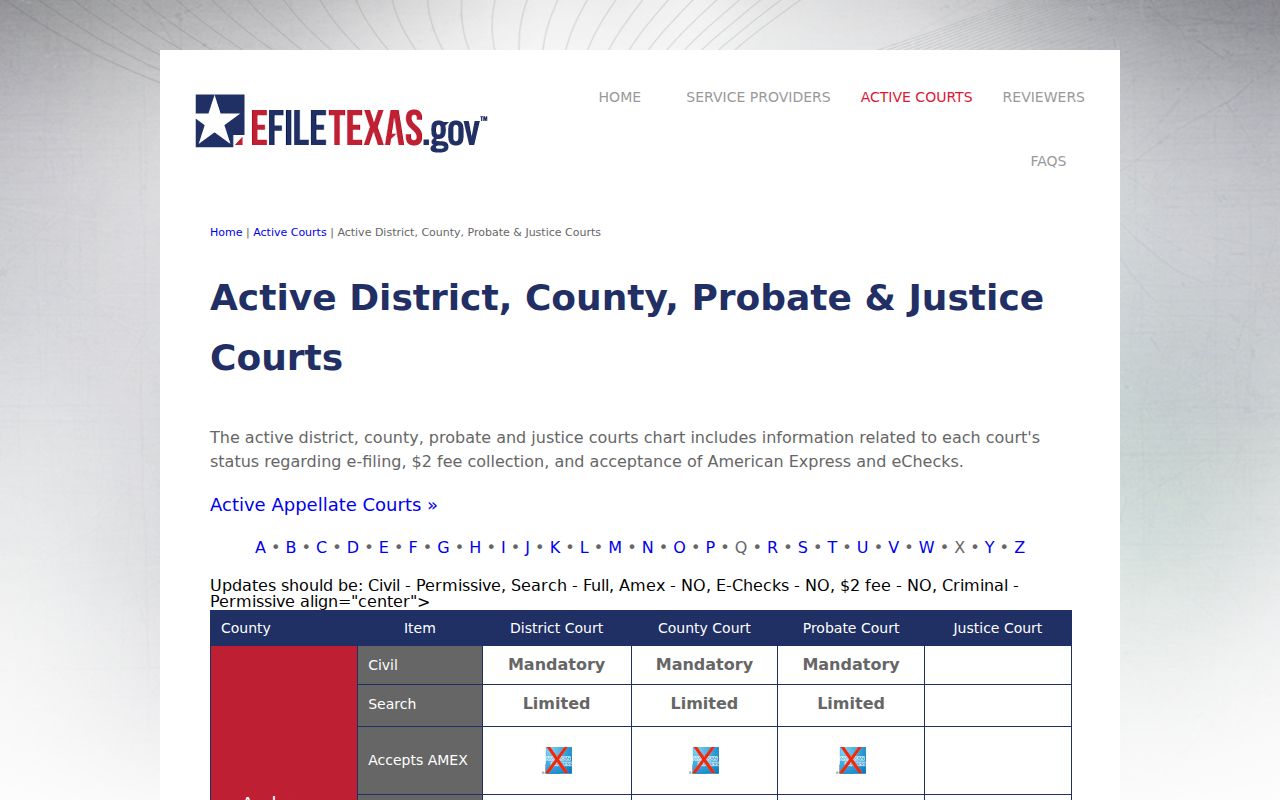
Use eFileTexas for submission questions. Use the clerk, local public-access portal, or re:SearchTX for inspection and copy questions.
Sealed Records and Public Access
Texas court access does not fit one open-records rule. Court case files follow court rules and applicable law. Rule 12 of the Texas Rules of Judicial Administration governs judicial records other than court case records. The Texas Public Information Act may govern an administrative county record, but Texas Government Code Section 552.0035 directs judicial records to Supreme Court rules and other law. Asking the right custodian which framework applies is part of a sound Navarro County court record request.
Texas Rule of Civil Procedure 76a begins with a presumption that court records are open, yet sealing can occur after the required showing and process. Family-law exceptions and records made confidential by statute remain important. Juvenile records are restricted under Family Code Chapter 58. Sensitive residence data in protective-order matters may also be protected. A public case name or docket line therefore does not promise access to each document.
Key Texas access rules:
Rule 12 supports access to judicial records other than case records, subject to exemptions and a specific written request.
Texas Rule of Civil Procedure 76a states the open-record presumption and the process for sealing covered court records.
Texas Family Code Chapter 58 restricts juvenile records and identifying information.
Redaction also matters. Government Code Section 552.147 permits removal of a living person's Social Security number. Do not place full identifiers in a public request. If the record cannot be released, ask whether a redacted public copy, docket sheet, or written access decision is available.
Navarro Records Before 1995
The County Clerk says its records are computerized from 1995 forward and that current real-property, public, probate, criminal, and Commissioners Court records are scanned each day. That date is a useful access baseline, but it is not a statement that every court document filed since 1995 can be viewed from home. Court, case type, public status, and image availability still control what a search returns.
Older research should begin with the correct clerk rather than a wider name search. Give the court, an approximate year, the record type, and any known case number. The clerk's work to bring some older official-public-record material back toward 1985 is a records-management project, not proof of a complete online court-file archive. Historical newspapers and local collections can add context, but only the custodian can supply an official court record.
For an older District Court case, contact the District Clerk. For an older County Court or probate file, contact the County Clerk. Ask whether the public portion is indexed, stored on paper, imaged, or available through another inspection method.