
How to Search Cases by Name
The official Navarro Odyssey endpoint is linked by both major clerk pages for public searches. It returned HTTP 403 during the September 2026 research check, so its current Navarro fields and match rules could not be observed. Do not assume that a blocked page or empty result means no case exists. When available, begin with a narrow name and the correct court or case category.
- Identify whether the case belongs to District Court, County Court, a justice court, or a municipal court.
- Open the official local portal. If it remains blocked, move to the clerk or statewide fallback.
- Enter the last name and first name as the official form permits, then narrow by court, case type, or date.
- Compare possible matches by court, filing date, case type, and public case number.
- Open the case detail and confirm key facts with the clerk before relying on them.
The local interface was not accessible enough to verify which fields are required. The table separates confirmed statewide controls from local items that need a live recheck.
| Field Label | Type | Required | Notes |
|---|---|---|---|
| Party or keyword | Text | Search-dependent | Confirmed in re:SearchTX guidance |
| Location | Filter | No | Use Navarro County or the known court location |
| Case category | Filter | No | Narrows broad name results |
| Case type | Filter | No | Use only when the type is known |
| Local first and last name | Unverified | Unverified | Recheck after the Navarro portal is reachable |
Navarro Case Lookup Portal Status
The county URL is official, but the failed access check prevented a truthful field-by-field local walkthrough. Tyler's vendor guide describes standard location, case-number, and party-name concepts. Those are useful expectations, not proof of Navarro's live menus. Searchers should keep the exact URL and the date of the attempted lookup, then use the clerk channels.
The official re:SearchTX landing page shows the statewide sign-in layer available when a local lookup needs a second route.
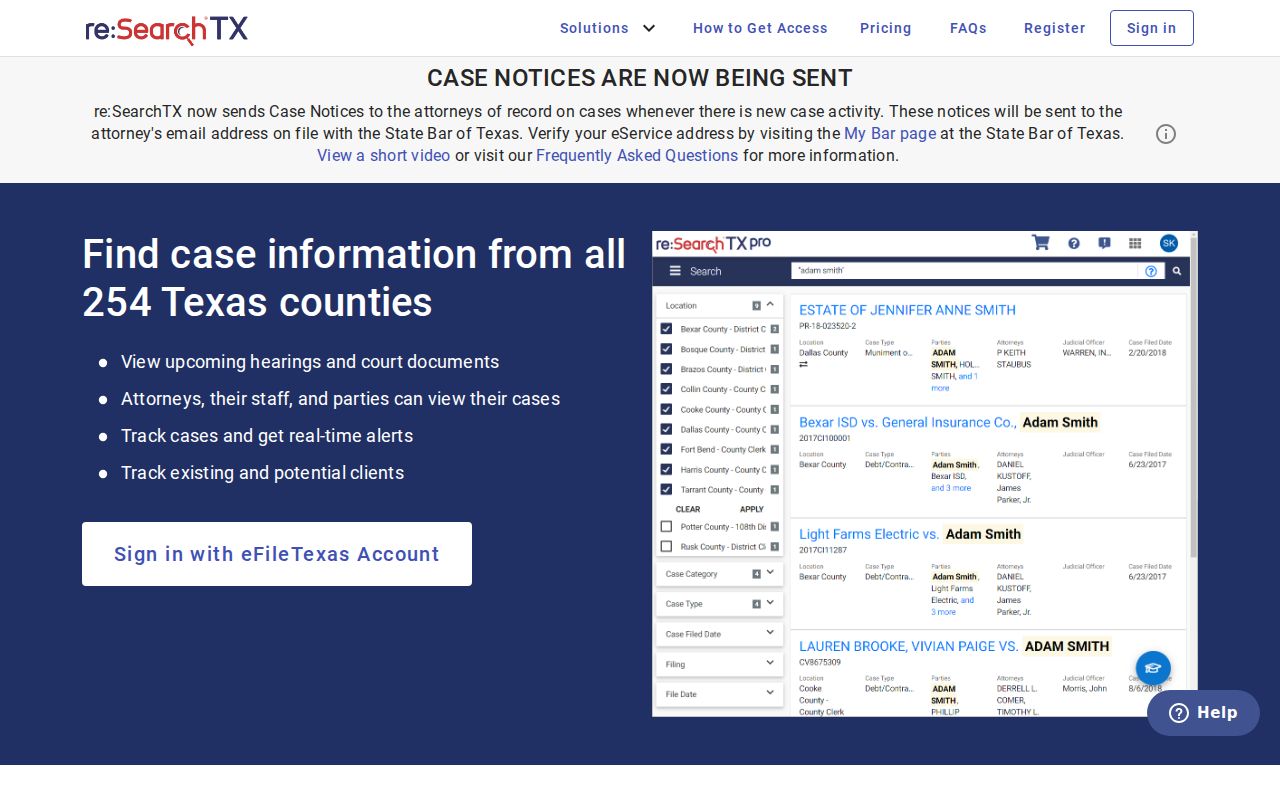
The statewide screen is a cross-check, not proof of complete Navarro coverage. A local access error is a system condition and says nothing about whether a named case exists.
How to Search by Case Number
A case number is more precise than a name, but Navarro County uses several courts and record systems. Enter the number exactly as printed, including letters, zeros, punctuation, and spacing when the form accepts them. The inspected JP docket files show type codes such as CR for criminal and CV for civil. They do not establish one countywide format, annual sequence, or code list.
If an exact search fails, do not invent a new format. Confirm the number with the issuing court or clerk. A citation number may belong to a municipal payment system rather than the county case portal. A District Court number belongs with the District Clerk, while a County Court misdemeanor or probate number belongs with the County Clerk.
Navarro Case Lookup Court Routing
The Navarro District Clerk is the local gateway for 13th District Court civil, felony criminal, family, and juvenile case information. The County Clerk keeps County Court misdemeanor and probate records. Justice-court cases remain with the numbered precinct. City citations remain with Corsicana, Kerens, Rice, Blooming Grove, or Dawson municipal court.
| Matter | First custodian | Search note |
|---|---|---|
| Felony or district civil | District Clerk | Use 13th District Court as a key filter |
| County misdemeanor or probate | County Clerk | Use the County Court record route |
| Small claim, eviction, fine-only JP case | Named JP precinct | Check its calendar or docket PDF |
| City citation | Named municipal court | A payment lookup is not a full case file |
Selecting the custodian first prevents a valid case number from being tested in the wrong system.
What a Case Search Shows
Search depth varies. A result may show an index and docket events without downloadable papers. The sample Navarro JP PDFs are date-specific calendar records with type, time, court-date type, case number, offense or action, and party fields. re:SearchTX can provide case, filing, text, and hearing result modes, with detail links, export tools, saved searches, and possible document purchases.
| Case number | The court identifier, which must be read with its court and case type. |
|---|---|
| Style or parties | The public case caption or party names, subject to access limits. |
| Case type | Civil, criminal, family, probate, juvenile, or another court category. |
| Dates | Filed dates, event dates, or hearing dates, depending on the result view. |
| Status or action | An administrative or docket label, not a substitute for the signed order. |
A setting is not a disposition. A disposition count is not a finding about what happened to any one party. Open the available detail, then request the filed order or judgment when the outcome matters.
Navarro Case Lookup Result Limits
A public docket and a full case file are different. A portal may list the case but withhold an attachment because of role-based access, redaction, sealing, purchase rules, or clerk processing. E-filing adds another distinction. eFileTexas marks Navarro filing as mandatory for civil and criminal work and notes limited search, but filing infrastructure is not a complete public viewer.
Recent electronic material may appear sooner than an older paper file. The County Clerk says its records are computerized from 1995 forward, yet that does not guarantee a web image for every case. For an older or missing record, give the clerk a court, case type, approximate year, name, and number if known.
Best evidence: Use the lookup to locate the case, then obtain the public filed order or certified record from its custodian when the text matters.
County vs Statewide Case Search
re:SearchTX is the Texas statewide layer for eligible public electronic records. Its official guide describes sign-in, Cases, Filings, Text, and Hearings modes, location and case filters, exports, saved searches, and document purchase. The Navarro portal is the locally linked search endpoint. Neither should be described as complete.
| Statewide re:SearchTX | Navarro County portal |
|---|---|
| Eligible integrated public electronic records across participating Texas courts | Locally linked criminal, civil, family, and probate search route |
| Account and role limits; restricted material excluded; some documents may cost money | Live Navarro fields could not be verified because the endpoint returned 403 |
| Useful for a statewide cross-check and hearing search | Useful as the official local starting point for a known Navarro case |
Statewide research reports also describe a criminal-record coverage gap. Compare any result with the local clerk, especially for criminal, older, sealed, juvenile, or newly filed material.
Navarro Case Lookup Fallback Ladder
When a portal fails, the official fallback is direct. District Clerk Joshua B. Tackett's office is in Suite 201 at 300 W 3rd Avenue, Corsicana, with phone 903-654-3040 and mail at P.O. Box 1439, Corsicana, TX 75151. County Clerk Sherry Dowd is at the same courthouse, phone 903-654-3035, with mail at P.O. Box 423, Corsicana, TX 75151-0423 and public-record email ccor@navarrocounty.org.
Call first, visit the correct counter during its posted hours, or mail a specific request. The County Clerk accepts email for its public-record route. Justice-court phone and email contacts appear on the county JP page. Municipal case requests go to the issuing city court. A written request should name the existing record, not ask the clerk to create a new report.
For a hearing rather than a file, check the county or JP calendar and then confirm with the court. For a copy, state whether a plain or certified version is needed. Avoid unnecessary personal identifiers in ordinary mail or email.
Restricted Cases and Access Rules
Texas Rule of Civil Procedure 76a begins with a presumption that covered court records are open, but it also provides a sealing process and recognizes exceptions. Family records may contain protected information. Texas Family Code Chapter 58 restricts juvenile records and identifying data. Protective-order records can omit sensitive residence information. A case can appear while some documents remain unavailable.
Rule 12 of the Texas Rules of Judicial Administration governs judicial records other than court case records. The Texas Public Information Act does not govern all judicial material in the same way. A request should go to the proper custodian and identify the existing record with reasonable detail. Access to a restricted file requires the legal process that applies to that file; a public portal cannot grant it.
Public access has limits: A missing case or document can reflect sealing, confidentiality, redaction, coverage, processing, or a search in the wrong court. Ask the custodian which reason applies.
Navarro Case Search Date Matters
Dockets change as papers are accepted, hearings are reset, and orders are signed. Record the date of each Navarro County case lookup. Check the live setting again near the hearing, and confirm a critical date by phone. A saved result or printed calendar is a snapshot.
Portal uptime, clerk hours, fee schedules, court assignments, and statewide integration can also change. The local Odyssey endpoint was blocked during the research pass, while Texas continued its statewide integration work. Current clerk pages should control contact details. Current court orders and filed records should control case facts.
For the record behind a search result, follow the Navarro County court record request routes. That step separates an index match from the official file.